Meta Description (150 characters):
Learn the best way to complete a post-trip DVIR accurately. Improve safety, reduce violations, and stay DOT compliant with this step-by-step guide.
URL Slug: /best-way-to-fill-out-driver-vehicle-inspection-report
Featured Image Alt Text (Max 40 Characters)
“Driver completing post-trip DVIR checklist”
Ensuring your vehicle is safe and road-ready is not just a DOT requirement, it’s a critical part of protecting drivers, fleets, and the public. A Driver Vehicle Inspection Report (DVIR) helps you document vehicle conditions, catch defects early, and avoid costly breakdowns or violations.
But many drivers still rush through the DVIR or miss important steps. In this guide, we break down the best and easiest way to fill out a post-trip DVIR so you stay compliant and safe.
What Is a DVIR?
A Driver Vehicle Inspection Report is a daily inspection record required by the FMCSA. Drivers must complete a post-trip inspection at the end of each driving day, documenting any defects or safety concerns.
A proper DVIR includes:
- Vehicle identification
- Driver’s details
- Inspection checklist
- Defects found
- Corrective measures
- Signature
Why Is the Post-Trip DVIR Important?
Completing a DVIR after the trip ensures:
- Your mechanic can repair issues before the next shift
- Safety violations are reduced
- Your fleet stays DOT-compliant
- Drivers avoid Out-of-Service (OOS) situations
- CSA scores remain strong
This simple report can prevent accidents, delays, and expensive fines.
Best Way to Fill Out a Driver Vehicle Inspection Report After a Trip
Here is a step-by-step, driver-friendly method to complete your DVIR correctly every time:
1. Park Safely & Secure the Vehicle
Before inspecting anything, ensure the vehicle is:
- Parked in a safe area
- On level ground
- Brakes engaged
- Engine turned off
This ensures a safe inspection environment.
2. Start With Basic Vehicle Information
Fill in the required identification details:
- Truck or tractor number
- Trailer number (if any)
- Date and location
- Odometer reading
- Fleet or company name
Accurate data ensures proper tracking in maintenance logs.
3. Conduct a Complete Walk-Around Inspection
A post-trip inspection should cover all major components. The driver should walk around the vehicle and check:
Exterior Components
- Lights & reflectors
- Tires, wheels, and rims
- Brakes (visual check)
- Suspension
- Coupling devices
- Fuel tank & cap
- Mirrors
Interior Components
- Horn
- Windshield wipers
- Emergency equipment
- Seat belts
- Gauges & indicators
Engine Compartment
- Fluid leaks
- Belts & hoses
- Oil levels
- Cooling system
Drivers don’t need to be mechanics, they simply need to document what looks unsafe or abnormal.
4. Record Any Defects or Issues Found
If you notice defects, list them clearly in the DVIR, such as:
- Faulty brakes
- Worn tires
- Cracked windshield
- Malfunctioning lights
- Fluid leaks
Make sure to be specific:
Instead of saying: “Brakes not good”
Write: “Left rear brake squealing; reduced stopping performance.”
5. If No Defects, Mark ‘No Issues Found’
Drivers should still complete the DVIR even when everything is fine.
Mark “No defects” or “Vehicle safe to operate.”
This protects the driver and fleet by showing inspections were completed consistently.
6. Submit the DVIR to Maintenance or Fleet Manager
A post-trip DVIR must be reviewed and, if needed, repaired before the next trip.
The mechanic or maintenance team should:
- Inspect reported defects
- Complete repairs
- Sign off confirming repairs
This closes the compliance loop.
7. Sign and Date the DVIR
A DVIR is not complete without signatures.
Required signatures include:
- Driver’s signature (confirming report accuracy)
- Mechanic’s signature (if repairs are made)
Digital DVIR apps automatically record these.
8. Keep the DVIR for Records (Paper or Digital)
DOT requires fleets to keep DVIRs for at least 3 months.
Using digital DVIR systems makes storing, searching, and auditing much easier.
Best Practices for Accurate & Compliant DVIRs
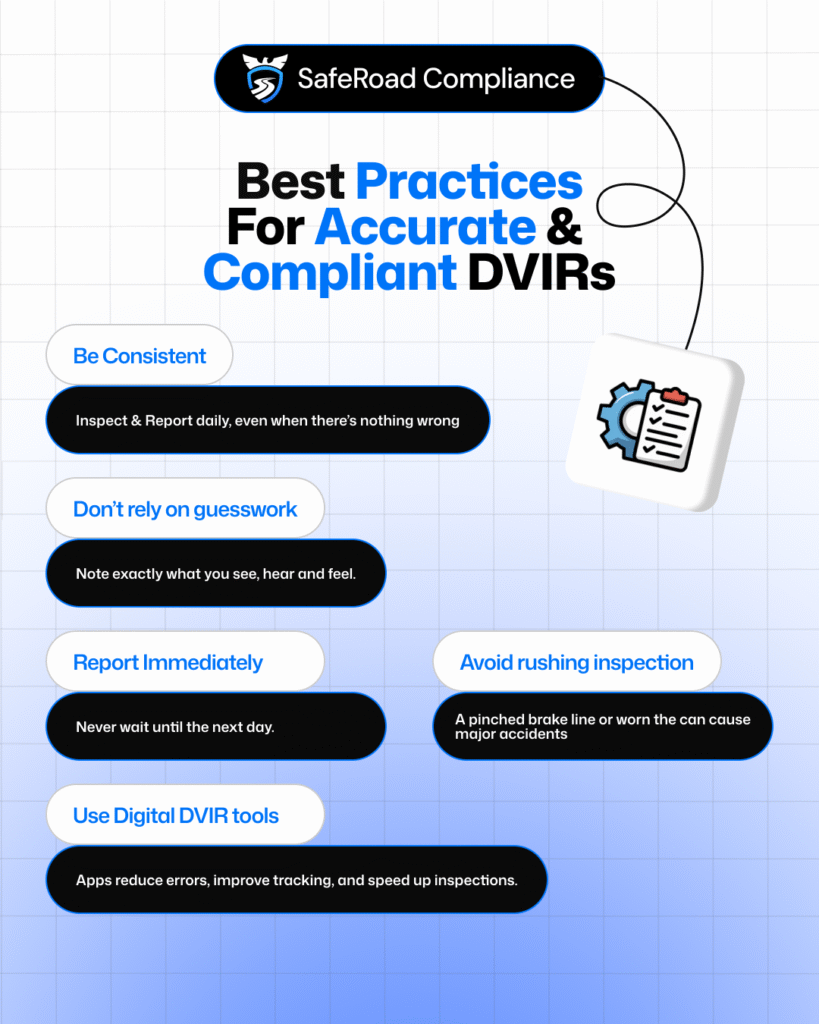
✔ Be consistent
INSPECT and REPORT daily, even when there’s nothing wrong.
✔ Don’t rely on guesswork
Note exactly what you see, hear, or feel.
✔ Report defects immediately
Never wait until the next day.
✔ Use digital DVIR tools
Apps reduce errors, improve tracking, and speed up inspections.
✔ Avoid rushing the inspection
A pinched brake line or worn tire can cause major accidents.
Common Mistakes to Avoid
❌ Skipping the walk-around
❌ Assuming the last driver already checked
❌ Not reporting “minor” issues
❌ Leaving unclear or generic notes
❌ Forgetting the signature
A few extra minutes spent on accuracy can prevent a serious safety violation or accident.
Final Thoughts
A well-filled post-trip DVIR is one of the most effective tools for maintaining driver safety, vehicle reliability, and DOT compliance. By following this simple step-by-step process, fleet operators and drivers can drastically reduce the risk of defects, breakdowns, and CSA penalties.
Need Help With DOT Compliance?
If you want expert support with inspections, compliance management, and fleet safety, SafeRoad Compliance is here to help.
📞 +1 202-769-0698
✉️ support@saferoadcompliance.com