Disclosure: Informational only. We are not FMCSA or USDOT. Always verify your status directly through official FMCSA systems.
Introduction
A roadside inspection or crash report can have lasting consequences for a motor carrier. Incorrect violations may increase your Compliance, Safety, Accountability (CSA) scores, influence insurance costs, affect business opportunities, and trigger additional FMCSA scrutiny. Fortunately, carriers are not required to accept every violation if they believe it contains factual errors.
The FMCSA DataQs system allows motor carriers, owner-operators, and commercial drivers to request a review of certain safety data maintained by the Federal Motor Carrier Safety Administration (FMCSA). When supported with credible evidence, a successful DataQs request may result in corrected inspection information, amended crash records, or the removal of incorrectly assigned violations.
However, DataQs is often misunderstood. Many carriers assume it can be used to overturn citations or erase legitimate violations, while others miss important deadlines or submit requests without sufficient documentation. Understanding what the system can, and cannot, do is essential before filing a challenge.
This guide explains how the FMCSA DataQs process works, which violations may be disputed, what evidence reviewers typically expect, how state agencies evaluate requests, potential timelines, and what options remain if your request is denied.
What Is FMCSA DataQs?
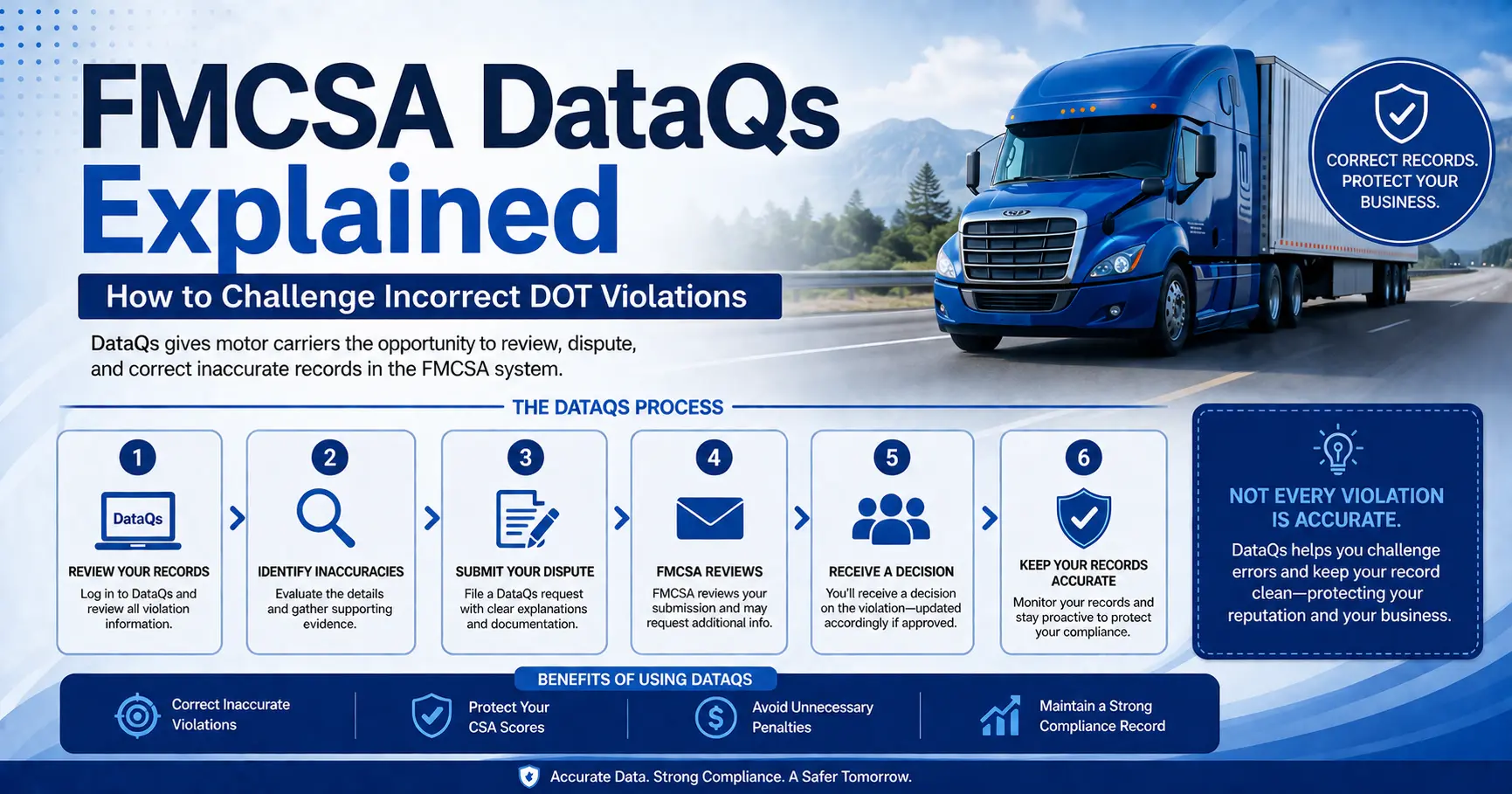
FMCSA DataQs is an online data review system that allows carriers, drivers, and other stakeholders to question the accuracy of safety information maintained by FMCSA or submitted by state enforcement agencies.
Rather than appealing a traffic citation, DataQs focuses on the accuracy of the data entered into FMCSA systems. If inspection details, crash information, vehicle identifiers, or regulatory violations were recorded incorrectly, users may request that the responsible agency review the information and make corrections if appropriate.
The system is commonly used after:
- Roadside inspections
- Compliance investigations
- Crash reports
- Vehicle inspections
- Driver inspections
- State enforcement actions
Each request is reviewed by the agency responsible for the original record, not necessarily by FMCSA itself.
FMCSA DataQs at a Glance
Why Accurate FMCSA Safety Data Matters
Inspection violations don’t exist in isolation.
Information collected during roadside inspections and crash investigations feeds into several FMCSA safety programs that carriers rely on every day.
Incorrect data may influence:
- CSA Safety Measurement System (SMS) calculations
- Safety Intervention thresholds
- Insurance underwriting
- Customer and shipper evaluations
- Internal fleet safety reporting
- Driver performance reviews
Although not every correction automatically changes CSA results, inaccurate records can affect how regulators and industry partners evaluate a carrier’s safety performance.
For fleets with multiple power units or recurring inspections, even one incorrectly assigned violation can contribute to broader compliance concerns over time.
What Can Be Challenged Through FMCSA DataQs?
One of the biggest misconceptions is that every violation can be removed through DataQs.
In reality, the system is designed to correct factual errors, not to overturn enforcement decisions simply because a carrier disagrees with them.
Examples of information that may be challenged include:
Roadside Inspection Errors
Examples include:
- Incorrect USDOT number
- Wrong carrier assigned
- Incorrect vehicle information
- Driver identification errors
- Duplicate inspection records
Want to reduce the risk of inspection errors before they happen? Review our comprehensive DOT Roadside Inspection Checklist for Trucks to make sure your drivers, vehicles, and documentation are fully prepared for every roadside inspection.
Incorrect Violation Coding
If an inspector selected the wrong regulation or entered an incorrect violation code, supporting documentation may justify a review.
Examples may include:
- Incorrect CFR citation
- Wrong Out-of-Service designation
- Clerical data entry errors
Crash Data Issues
Carriers sometimes dispute crash records involving:
- Incorrect crash location
- Wrong vehicle identification
- Incorrect carrier assignment
- Duplicate crash entries
- Errors affecting crash preventability classifications where applicable
Driver Information Errors
Examples include:
- Incorrect CDL number
- Wrong driver listed
- License status errors
- Driver identification mistakes
Vehicle Information Errors
Some requests involve inaccurate equipment information, such as:
- Incorrect VIN
- Wrong license plate
- Incorrect trailer information
- Vehicle assigned to the wrong carrier
What Cannot Be Challenged Through FMCSA DataQs?
While FMCSA DataQs is an important tool for correcting inaccurate safety data, it is not a replacement for the court system or a formal appeal of enforcement actions.
Submitting a DataQs request does not automatically remove a violation or invalidate a citation. Instead, reviewers determine whether the information entered into FMCSA’s systems is factually accurate based on the evidence provided.
Generally, DataQs is not intended to:
- Dismiss a traffic citation issued by a law enforcement officer
- Overturn a criminal or civil court decision
- Remove a violation simply because the carrier disagrees with the inspector’s judgment
- Change federal regulations or inspection standards
- Eliminate accurate inspection records without supporting evidence
- Reverse enforcement actions unrelated to data accuracy
If your concern involves a traffic ticket or court conviction, you will typically need to resolve the matter through the appropriate court or administrative process rather than through DataQs.
What You Can and Cannot Challenge
Understanding these limitations helps carriers determine whether DataQs is the appropriate solution before investing time preparing a request.
Common Reasons Carriers Submit FMCSA DataQs Requests
Although every request is unique, certain situations appear more frequently than others.
Incorrect Carrier Assigned
A violation may be associated with the wrong USDOT number or operating authority.
This commonly occurs when:
- Similar company names exist.
- Incorrect carrier information is entered during an inspection.
- Leased equipment is assigned to the wrong carrier.
Duplicate Inspection Records
Occasionally, the same roadside inspection appears multiple times in FMCSA databases.
Duplicate entries may affect safety data unnecessarily and should be reviewed.
Clerical Errors
Simple administrative mistakes can affect safety records.
Examples include:
- Wrong inspection date
- Incorrect vehicle identification number (VIN)
- Driver identification errors
- Incorrect location information
- Wrong license plate number
Incorrect Regulatory Citation
An inspection may reference the wrong section of the Code of Federal Regulations (CFR).
If documentation demonstrates the violation was coded incorrectly, the reviewing agency may determine that a correction is appropriate.
Crash Information Errors
Some DataQs requests involve incorrect crash details, including:
- Wrong carrier listed
- Incorrect vehicle assignment
- Duplicate crash reports
- Errors in crash data entered into FMCSA systems
Should You Submit a DataQs Request?
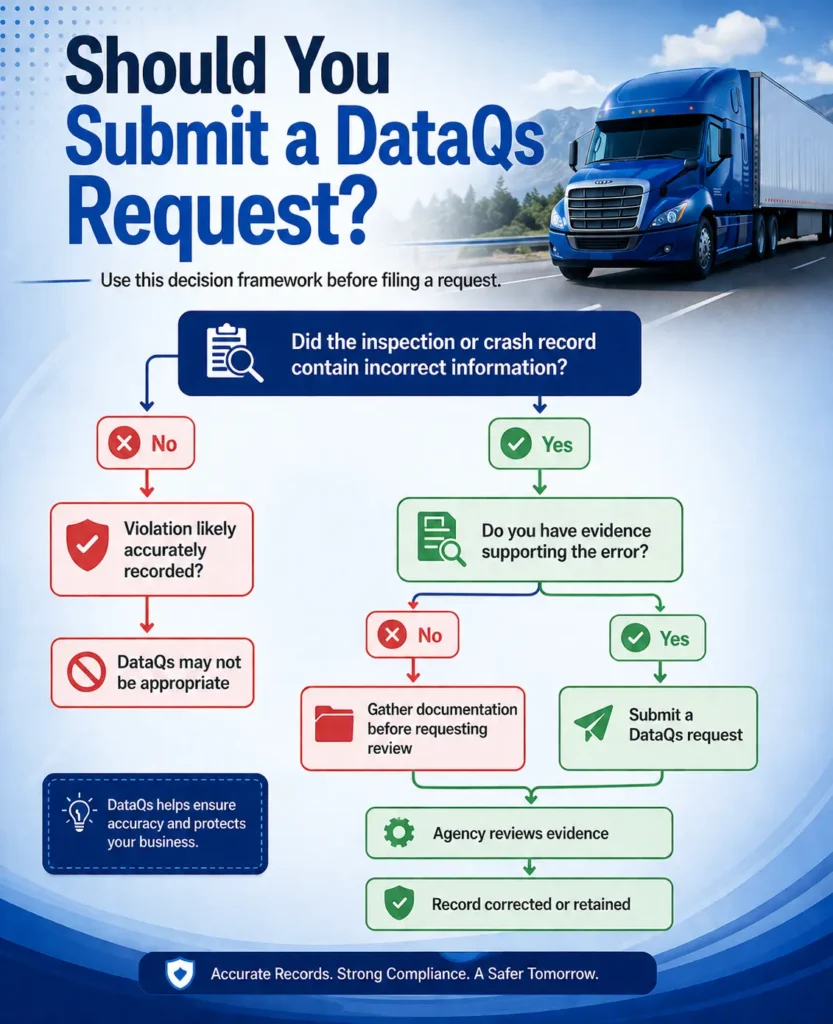
This framework is intended as a general guide. Always review your inspection report carefully before deciding whether to submit a DataQs request.
How the FMCSA DataQs Process Works
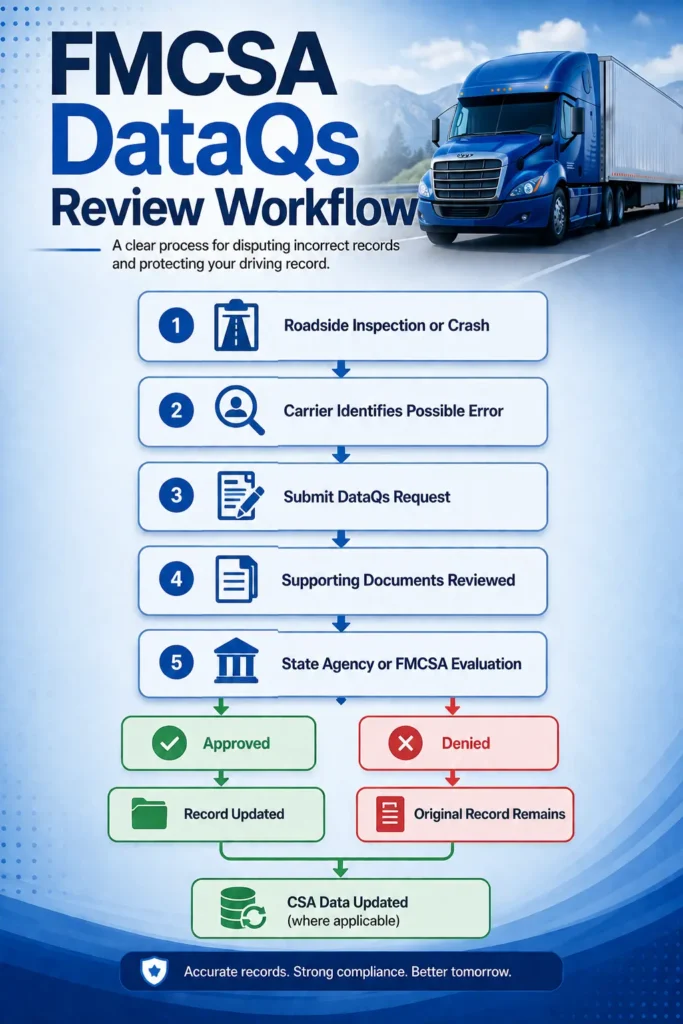
Although every request is different, the review process generally follows the same sequence.
Step 1: Review the Inspection or Crash Record
Carefully compare the inspection report with your company records.
Identify every factual error before beginning the submission.
Step 2: Collect Supporting Documentation
Gather evidence that supports your request.
Examples include:
- Inspection reports
- Driver logs
- Bills of lading
- Maintenance records
- Photographs
- Dash camera footage
- Repair invoices
- Vehicle registration records
- Court documents (when applicable)
Strong documentation generally leads to a more effective review.
Step 3: Submit Your DataQs Request
Create a request through the FMCSA DataQs system.
Provide:
- Inspection or crash report number
- USDOT number
- Clear explanation of the issue
- Supporting evidence
- Contact information
Avoid emotional language.
Instead, explain the facts clearly and reference the supporting documents.
Step 4: Agency Review
After submission, the request is routed to the state agency or FMCSA office responsible for the original record.
Reviewers evaluate:
- The information submitted
- Supporting documentation
- Inspection records
- Applicable regulations
- Original enforcement documentation
Additional information may be requested if the initial submission is incomplete.
Step 5: Receive the Decision
Once the review is complete, the agency typically issues one of several outcomes:
- Request approved
- Request partially approved
- Request denied
- Additional information requested
The outcome is communicated through the DataQs system.
Required Evidence for a Successful DataQs Dispute
One of the most common reasons DataQs requests are unsuccessful is insufficient documentation.
A statement such as “the inspector was wrong” is rarely enough to support a correction.
Instead, submit objective evidence whenever possible.
Helpful Supporting Documents
Remember that the reviewing agency evaluates the quality and relevance of the evidence, not simply the number of documents submitted.
Best Practices When Preparing Your Request
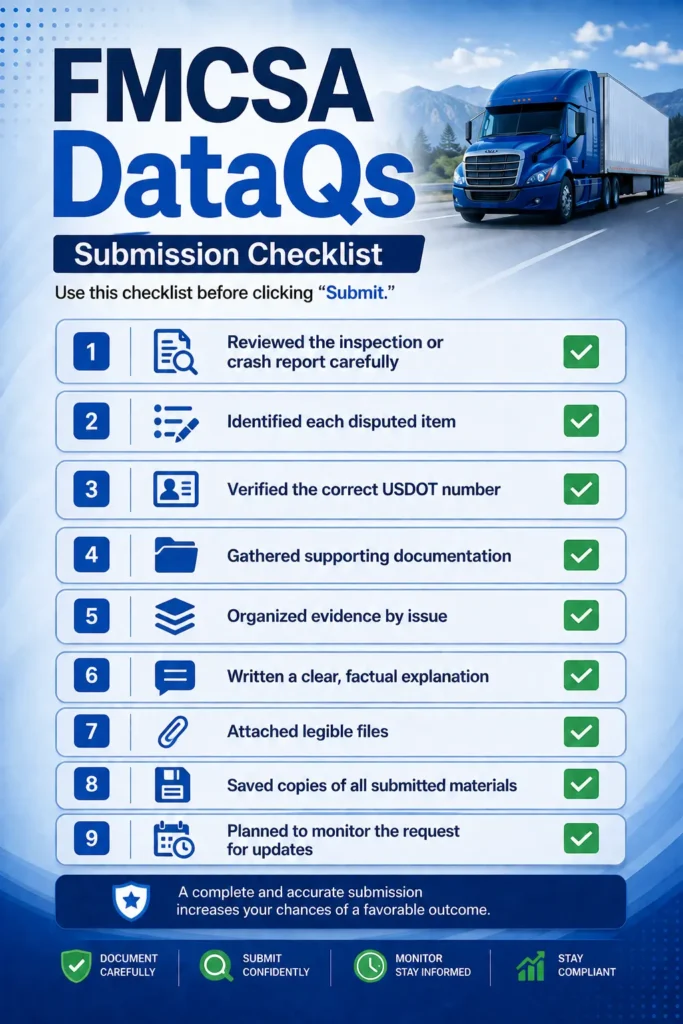
Before submitting a DataQs dispute:
- Review every inspection detail carefully.
- Verify your USDOT and vehicle information.
- Explain each disputed item separately.
- Attach only relevant supporting documents.
- Keep your explanation factual and professional.
- Retain copies of everything submitted.
- Monitor the request regularly for updates or additional information requests.
Well-organized submissions are easier for reviewers to evaluate and may reduce unnecessary delays.
How the State Review Process Works
After you submit a DataQs request, it is forwarded to the agency responsible for the original inspection, crash report, or safety record. In many cases, this is the state enforcement agency that conducts the roadside inspection, although some requests may be reviewed by FMCSA.
The reviewing agency evaluates whether the information in the record is accurate based on the evidence available.
During the review, officials may consider:
- The original inspection or crash report
- Officer notes and supporting documentation
- Applicable FMCSA regulations
- Evidence submitted by the carrier
- Driver statements, when relevant
- Additional records maintained by the agency
If the reviewer determines that the data contains factual errors, the record may be corrected. If the original record is supported by the available evidence, the request will generally be denied.
The review focuses on data accuracy, not whether the carrier believes the violation was unfair.
FMCSA DataQs Review Workflow
How Long Does a DataQs Review Take?
There is no universal processing timeline for DataQs requests.
The review period depends on factors such as:
- The complexity of the request
- The completeness of supporting documentation
- The workload of the reviewing agency
- Whether additional information is required
- Coordination between state agencies and FMCSA, when applicable
Simple clerical corrections may be resolved relatively quickly, while disputes involving inspection findings or crash records can take considerably longer.
Submitting complete documentation with your initial request can help avoid unnecessary delays caused by requests for additional information.
What Happens if Your DataQs Request Is Denied?
A denied request does not necessarily mean your concerns were ignored. It simply means the reviewing agency determined that the available evidence supports the existing record or that there was insufficient documentation to justify a correction.
Depending on the circumstances, you may be able to:
- Review the agency’s explanation carefully.
- Gather additional supporting evidence.
- Submit a follow-up request if new information becomes available.
- Pursue other administrative or legal remedies when appropriate.
Before submitting another request, ensure that your new evidence directly addresses the reason for the denial. Repeating the same arguments without additional documentation is unlikely to produce a different outcome.
Does DataQs Affect CSA Scores?
One of the most common questions carriers ask is whether a successful DataQs request will improve their CSA scores.
The answer depends on the type of correction made.
If an inspection violation, crash record, or other safety data used by the Safety Measurement System (SMS) is corrected or removed, the associated CSA calculations may also be updated. However, not every DataQs decision results in a measurable change to a carrier’s safety profile.
The impact depends on several factors, including:
- The type of violation involved
- Whether the record contributes to SMS calculations
- The carrier’s overall inspection history
- Other violations within the same BASIC category
Because CSA scores are calculated using multiple data points over time, correcting one record does not automatically eliminate safety concerns across the entire profile.
For a broader understanding of how violations influence safety performance, see our guide on CSA Scores Explained.
Common Mistakes When Filing a DataQs Request
Many requests are delayed, or denied, because avoidable mistakes weaken the submission.
Common errors include:
- Filing without reviewing the inspection report carefully
- Providing little or no supporting documentation
- Challenging valid violations instead of factual errors
- Submitting emotional or argumentative explanations
- Combining multiple unrelated issues into one request
- Uploading unclear or incomplete documents
- Ignoring requests for additional information from the reviewing agency
A well-organized submission supported by objective evidence gives reviewers the information they need to evaluate your request efficiently.
Best Practices for a Strong DataQs Submission
Before submitting your request:
- Verify every inspection detail against your records.
- Organize supporting documents logically.
- Explain each disputed item separately.
- Reference evidence that directly supports your claim.
- Use clear, factual language.
- Keep copies of everything submitted.
- Monitor your request until a final determination is issued.
If the issue could significantly affect your compliance profile, consider conducting an internal review of related records to identify any additional discrepancies.
FMCSA DataQs Submission Checklist
Expert Tips
- Focus on facts, not opinions.
- Support every disputed point with documentation whenever possible.
- Submit requests promptly after discovering an error.
- Maintain organized inspection and maintenance records throughout the year.
- Train drivers to review inspection reports before leaving the inspection site whenever practical.
- Periodically monitor your FMCSA safety data to identify errors before they affect business operations.
- Address recurring compliance issues through internal corrective actions rather than relying solely on DataQs.
Conclusion
The FMCSA DataQs system provides carriers with an important opportunity to correct inaccurate inspection, crash, and safety records. While it cannot overturn valid enforcement actions or erase properly documented violations, it can help ensure that FMCSA’s safety databases accurately reflect your company’s compliance history.
A successful DataQs request begins with understanding what can be challenged, gathering credible evidence, and presenting a clear, factual explanation. Carriers that maintain organized records and respond promptly to potential inaccuracies are better positioned to protect their safety profile and reduce unnecessary compliance risks.
If your inspection history, CSA performance, or audit findings involve complex compliance issues, professional guidance can help you evaluate the appropriate next steps. SafeRoad Compliance provides DOT Audit Support to help carriers understand FMCSA requirements, organize documentation, and strengthen their overall compliance program.
Related Resources
Key Takeaways
- FMCSA DataQs is designed to correct inaccurate safety data, not overturn valid citations.
- Requests are reviewed by the agency responsible for the original inspection or crash record.
- Strong supporting documentation is essential for a successful review.
- Not every inspection violation is eligible for correction through DataQs.
- A successful DataQs request may affect CSA calculations when applicable.
- Complete and well-organized submissions typically improve the review process.
- Regularly monitoring your FMCSA safety records helps identify errors before they create larger compliance issues.
Frequently Asked Questions
FMCSA DataQs is an online system that allows carriers, drivers, and other stakeholders to request a review of potentially inaccurate inspection, crash, and safety data maintained by FMCSA.
It can result in the correction or removal of a violation if the reviewing agency determines that the record contains factual errors supported by credible evidence.
No. Traffic citations and court convictions are handled through the appropriate court or administrative process, not through the DataQs system.
Helpful evidence may include inspection reports, ELD records, maintenance documents, photographs, dash camera footage, bills of lading, registration records, and other documents relevant to the disputed information.
Processing times vary depending on the complexity of the request, the reviewing agency’s workload, and whether additional documentation is required.
If the corrected record is used in FMCSA’s Safety Measurement System, the related CSA calculations may be updated. The overall impact depends on your complete safety record.
You should review the agency’s explanation carefully. If additional supporting evidence becomes available, you may be able to submit a follow-up request or pursue other available remedies where appropriate.
Not necessarily. DataQs is most appropriate when you identify factual inaccuracies or administrative errors in inspection or crash records that can be supported with objective evidence.