Disclosure: Informational only. We are not FMCSA or USDOT. Always verify your status directly through official FMCSA systems.
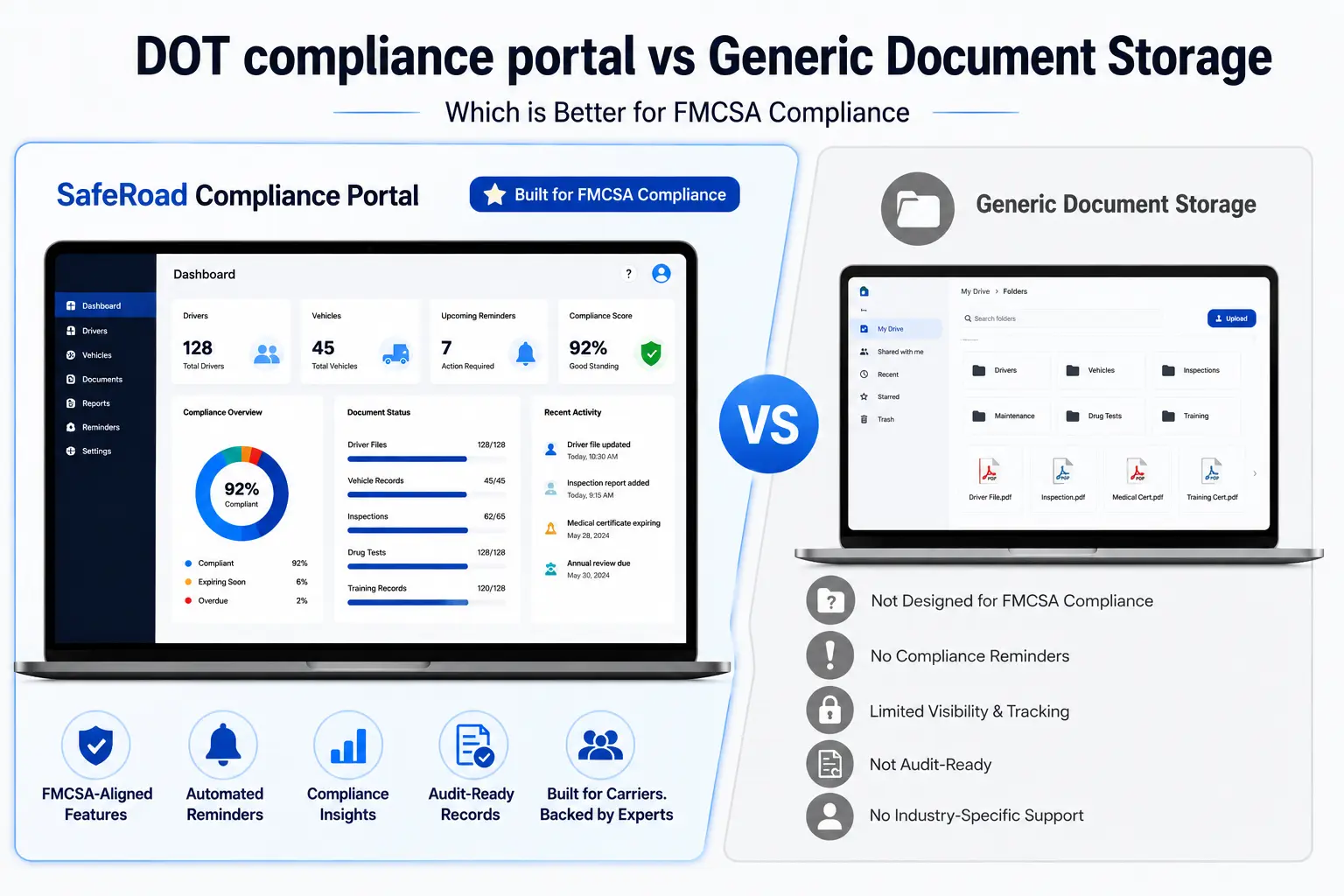
Many trucking companies rely on Google Drive, Dropbox, OneDrive, or shared folders to store compliance documents. While these platforms are excellent for file storage, they were never designed to manage FMCSA compliance.
As fleets grow, so do compliance responsibilities. Driver Qualification Files (DQFs), vehicle maintenance records, Hours-of-Service documentation, drug and alcohol testing records, and DOT deadlines require much more than simply uploading files to a folder.
This is where many carriers run into problems. A document may exist, but if it’s expired, incomplete, or impossible to find during an audit, it can still result in compliance violations.
In this guide, we’ll compare a purpose-built DOT compliance portal with generic document storage systems and explain why compliance software offers a significant advantage for motor carriers.
Why Google Drive Isn’t a Compliance System
Google Drive is an excellent collaboration tool, but it wasn’t built to manage DOT compliance.
It allows businesses to:
- Upload documents
- Share folders
- Organize files
- Collaborate with team members
However, FMCSA compliance requires much more than document storage.
A compliance program must actively monitor deadlines, identify missing records, track document expirations, and organize files according to regulatory requirements.
Google Drive simply stores information, it doesn’t understand compliance.
Common Problems with Generic Storage
- Expired medical certificates remain unnoticed.
- Driver Qualification Files become incomplete.
- Annual reviews are forgotten.
- Vehicle inspection records are difficult to locate.
- Compliance deadlines are missed.
- Duplicate or outdated documents create confusion.
These issues often remain hidden until an FMCSA audit or roadside investigation.
Missing Compliance Logic
The biggest difference between generic storage and a compliance portal is compliance intelligence.
A compliance portal understands what documents are required, when they expire, and what actions need to be taken.
Generic cloud storage cannot:
- Detect missing Driver Qualification File documents
- Track CDL expiration dates
- Monitor Medical Examiner Certificates
- Alert users about annual MVR reviews
- Track vehicle inspection schedules
- Monitor maintenance deadlines
- Flag overdue compliance tasks
Instead, every deadline must be tracked manually.
As fleets grow, this manual process becomes increasingly difficult and prone to human error.
Audit Failures from Generic Storage
Many carriers assume they’re compliant simply because every document has been uploaded somewhere.
Unfortunately, FMCSA auditors don’t evaluate how many files you have, they evaluate whether required documents are complete, current, and readily available.
Common Audit Problems
Missing Documents
Required files may never have been uploaded.
Expired Documents
Medical certificates, insurance, or CDL records may have expired without anyone noticing.
Poor Organization
Searching multiple folders during an audit wastes valuable time and increases stress.
No Audit Trail
Generic storage doesn’t track compliance activities or record who updated documents.
Inconsistent File Naming
Different naming conventions make records difficult to locate quickly.
These documentation issues frequently contribute to audit findings, corrective actions, and compliance violations.
Purpose-Built Advantage
A dedicated DOT compliance portal is designed specifically around FMCSA regulations.
Instead of acting as a simple file cabinet, it becomes an active compliance management system.
Automated Expiration Tracking
Receive reminders before important documents expire.
Driver Qualification File Management
Store and organize DQFs in one centralized location while monitoring missing or incomplete records.
Compliance Dashboards
Quickly identify outstanding compliance tasks across your fleet.
Maintenance Tracking
Monitor inspections, preventive maintenance schedules, and vehicle service history.
Audit-Ready Records
Retrieve required documentation in minutes instead of searching through multiple folders.
Centralized Compliance Management
Manage drivers, vehicles, compliance tasks, and supporting documents from a single platform.
Rather than reacting to compliance issues after they occur, carriers can proactively resolve them before they become violations.
Risk Comparison
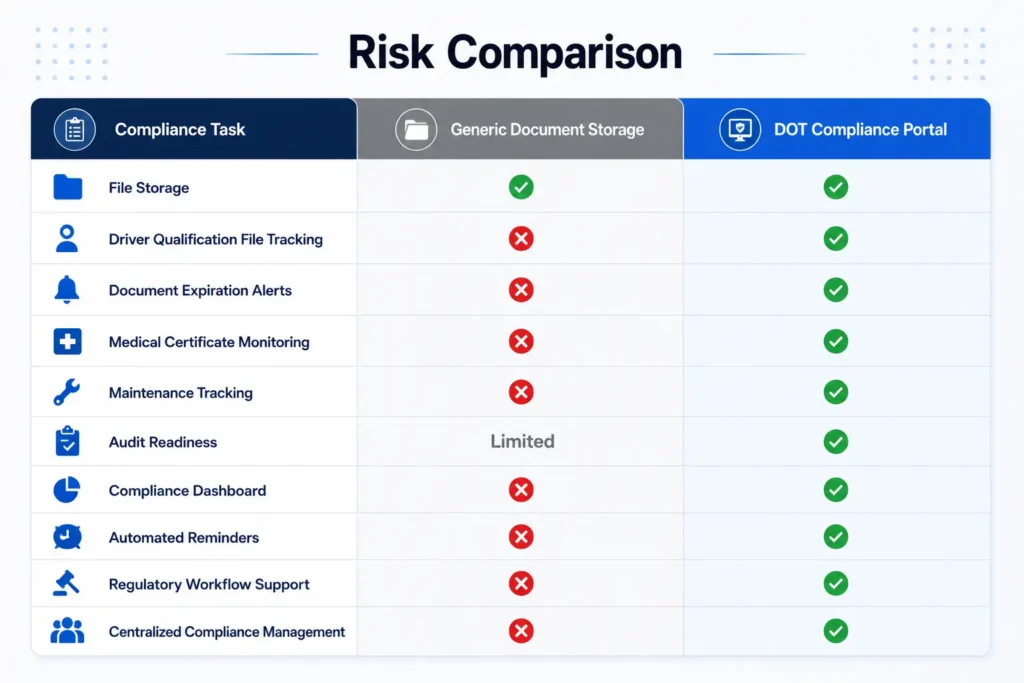
While generic storage solutions organize files, purpose-built compliance portals actively help carriers remain compliant.
How SafeRoad’s DOT Compliance Portal Helps
Managing compliance manually can quickly become overwhelming, especially as your fleet grows.
SafeRoad Compliance’s portal was designed specifically for trucking companies that need a centralized, audit-ready compliance solution.
Driver Compliance Management
Organize Driver Qualification Files, licenses, medical certificates, and other required documentation.
Automated Compliance Reminders
Receive alerts before important deadlines and document expirations.
Vehicle Compliance Tracking
Monitor inspections, maintenance schedules, DVIRs, and fleet records.
Secure Digital Record Storage
Store compliance documents in one secure, cloud-based location with easy access.
Audit Preparation
Quickly retrieve organized records during FMCSA audits or roadside inspections.
Compliance Visibility
View outstanding compliance tasks through an easy-to-use dashboard so nothing gets overlooked.
Whether you’re a new authority or an established fleet, SafeRoad Compliance helps simplify compliance while reducing administrative workload.
Conclusion
Generic document storage platforms like Google Drive are useful for organizing files, but they don’t provide the compliance logic required to manage FMCSA regulations effectively.
As compliance requirements become more complex, relying solely on shared folders increases the risk of missed deadlines, incomplete documentation, and audit findings.
A dedicated DOT compliance portal helps motor carriers move beyond simple document storage by automating reminders, organizing compliance records, tracking critical deadlines, and improving audit readiness.
For carriers looking to reduce risk and streamline operations, investing in purpose-built compliance software is a smarter long-term solution.
Key Takeaways
- Google Drive stores documents but does not manage compliance.
- Generic document storage cannot monitor FMCSA deadlines or document expirations.
- Missing or outdated records remain one of the most common audit findings.
- DOT compliance portals automate compliance tracking and reminders.
- Purpose-built software improves organization, efficiency, and audit readiness.
- SafeRoad Compliance’s portal centralizes drivers, vehicles, documents, and compliance tasks.
- Investing in compliance software helps reduce violations and administrative burden.
Frequently Asked Questions
No. Google Drive is designed for file storage and collaboration, not FMCSA compliance management. It cannot track document expirations, monitor regulatory deadlines, or identify missing compliance records.
A DOT compliance portal is a software platform designed to help trucking companies manage driver files, vehicle records, maintenance schedules, compliance deadlines, and audit documentation.
Generic storage platforms don’t provide automated compliance monitoring, increasing the risk of expired documents, missing records, and failed audits.
Yes. A purpose-built compliance portal organizes records, tracks deadlines, and makes required documentation easily accessible during audits.
Driver Qualification Files, medical certificates, CDL records, vehicle maintenance logs, DVIRs, Hours-of-Service documentation, drug and alcohol program records, and other FMCSA-required compliance documents.
Yes. Small fleets often benefit the most because compliance software reduces manual administration and helps prevent costly mistakes as the business grows.
SafeRoad Compliance’s portal centralizes compliance management by organizing records, tracking expirations, sending automated reminders, and helping carriers stay audit-ready year-round.
Ready to Simplify Your DOT Compliance?
Stop relying on spreadsheets and shared folders to manage critical compliance records.
With the SafeRoad Compliance Portal, you can organize driver files, track maintenance, receive automated compliance reminders, and keep your business audit-ready from one centralized platform.
Book a Free 15-Minute Compliance Consultation